

A remote work calendar in Microsoft Teams gives employees and managers one shared view of who is working remotely, who is expected in the office, and who is unavailable. It helps hybrid teams coordinate office days, arrange meetings, and plan coverage without searching through chat messages, spreadsheets, and individual calendars.
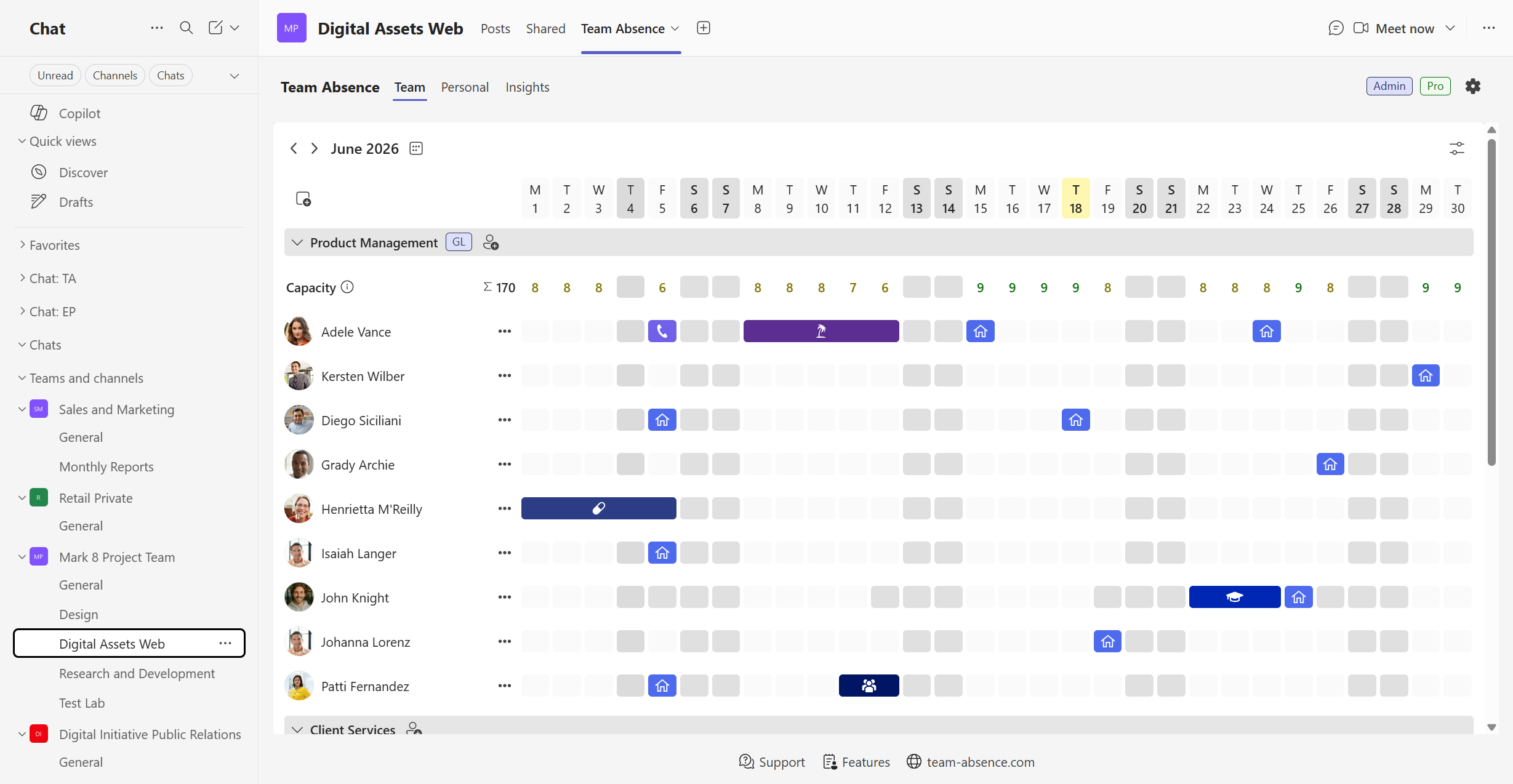
This guide shows you how to create that calendar with Team Absence, an absence and availability management app built for Microsoft Teams. Remote work can be recorded alongside vacation, PTO, sick leave, business travel, training, and other entry types. You can also decide whether remote-work entries need approval or can be added directly.
Why remote-work coordination matters
Remote work can create meaningful benefits, but those benefits are not automatic. Outcomes depend on factors such as employee autonomy, workload, task design, social support, and how well teams coordinate their time together.
Lower attrition in a hybrid-work trial
In a six-month randomized experiment involving 1,612 Trip.com employees, working from home two days per week reduced attrition without a detectable negative effect on performance ratings, promotions, or code output.
Read the 2024 Nature studyRemote work can reduce cross-team connections
A Microsoft employee study found that firm-wide remote work made collaboration networks more static and siloed, with fewer connections bridging different parts of the organization.
Read the 2022 Nature Human Behaviour studyA shared calendar makes one essential coordination question easy to answer: Who is working where, and who is available? That visibility gives hybrid teams a practical foundation for better decisions about meetings, office attendance, handovers, and project coverage.
Potential benefits and challenges of remote work
The scientific evidence does not support a blanket claim that remote work is always better or worse than office work. Results depend on the job, the person, the team, and the way remote work is organized.
The lesson is not that every team needs the same hybrid schedule. Flexibility works better when practical rules are clear and coworkers have access to current information.
What should a remote work calendar show?
A useful remote work calendar should help the team answer practical questions without requiring a separate conversation every time:
- Who is working remotely today?
- Who is expected in the office?
- Who is on vacation, taking PTO, or otherwise unavailable?
- When will the right people be together for an in-person meeting?
- Are important roles covered during a deadline or project phase?
- Is a remote-work entry confirmed or waiting for approval?
- Have plans changed since the calendar was last reviewed?
Work location and absence are not the same thing. Someone working remotely may still be fully available, while someone on PTO is unavailable. A structured calendar should make that difference clear instead of representing every status as a generic event.
How to set up a remote work calendar with Team Absence
The setup has six practical steps. Start with one team or department, agree on clear entry rules, and expand the calendar when the workflow is working well.
Add Team Absence to Microsoft Teams
Add Team Absence to a channel used by the relevant team, department, project, or organization. Employees can then record and review plans without switching to a separate application.
When you open the app, create a new board for the team or join an existing board if your organization already uses Team Absence elsewhere. Team members can be selected from your Microsoft 365 organization, so you do not have to maintain another user list.
Start where your team already works
Install the app, open it in Microsoft Teams, and create or join your first board.
Add the right members and groups
Add the employees whose availability should appear in the calendar. For a small team, one group may be enough. Larger organizations can use groups that reflect how people actually coordinate work.
The same employee can be relevant to more than one operational group. Organize the board around the people who need to plan together instead of copying an organizational chart without considering real working relationships.
- Departments
- Project teams
- Office locations
- Regions
- Cross-functional teams
- Entire organization
If an existing board should appear in another Teams channel, board administrators can share it and apply a group filter so the channel displays only the relevant groups.
Configure Remote Work as an entry type
Make sure Remote Work is available as a distinct entry type. Keeping it separate from vacation, sick leave, and other absences prevents a remote-working employee from being mistaken for someone who is unavailable.
Use a clear label and color that remain understandable when several entry types appear together. If your organization uses a term such as Work from Home, Home Office, or Off-site Work, choose one term and apply it consistently.
Direct entry
Useful when employees are free to choose remote days within an established policy.
Approval required
Useful when remote work depends on staffing levels, customer coverage, office requirements, or manager agreement.
Avoid adding approval purely for visibility. Unnecessary friction can discourage employees from recording changes promptly.
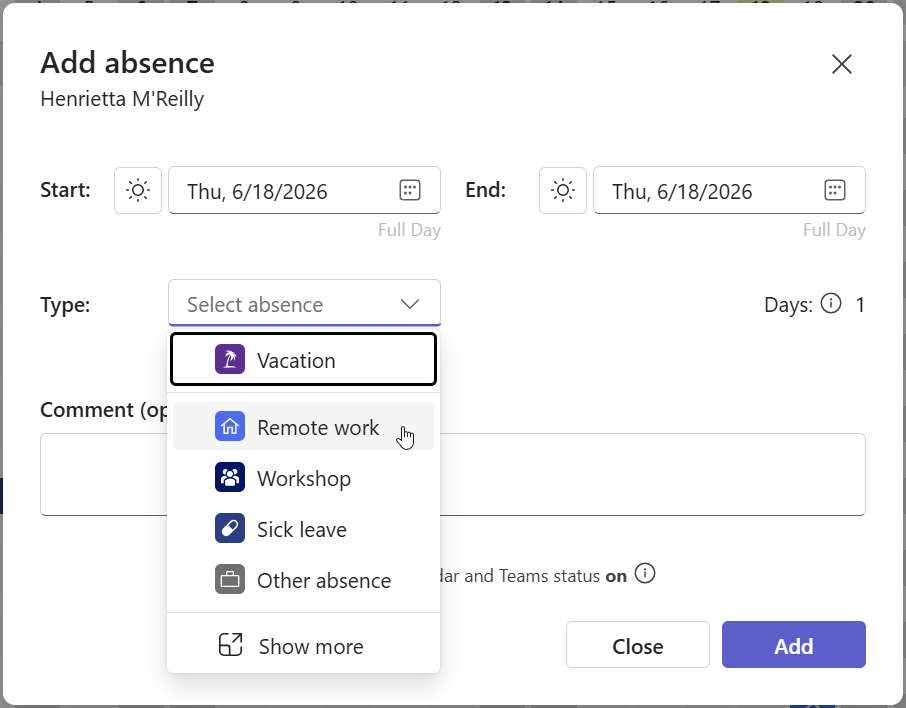
Create a remote-work entry
Employees can record a planned remote-work day in a short, consistent workflow:
- Open Team Absence in Microsoft Teams.
- Start a new entry from the Personal View or relevant board.
- Select Remote Work as the type.
- Choose the date or date range.
- Add a short comment if it provides useful context.
- Submit the entry.
A comment should contain only information coworkers or approvers genuinely need. If approval is not required, the entry can appear immediately. If approval is enabled, the employee can track its status while the appropriate manager reviews it.
Use the shared Team View
The Team View brings remote work and other availability information into a shared calendar inside Microsoft Teams. Coworkers can check one overview before making plans instead of comparing personal calendars or asking for updates in chat.
- Choose a day for an in-person workshop.
- Check whether a colleague will be in the office.
- Plan a handover before an absence.
- Review coverage during a deadline or holiday period.
- Coordinate departments, locations, or project groups.
- Avoid meetings with employees who are on leave.
The purpose is coordination, not surveillance. The calendar should show what people need for planning without treating work location as a measure of commitment or productivity.
Configure optional approval workflows
Some organizations let employees choose their work location freely. Others need a manager to confirm remote days because of customer coverage, scheduled events, or minimum office staffing. Team Absence can configure approvals by entry type.
- The employee submits the remote-work entry.
- The entry receives a visible status.
- The approver reviews it in the centralized workflow.
- The employee can see whether it is pending, approved, or rejected.
This keeps the decision and calendar record connected instead of separating a request into email or chat and expecting someone to update a different calendar afterward.
Learn how approval workflows work in Microsoft Teams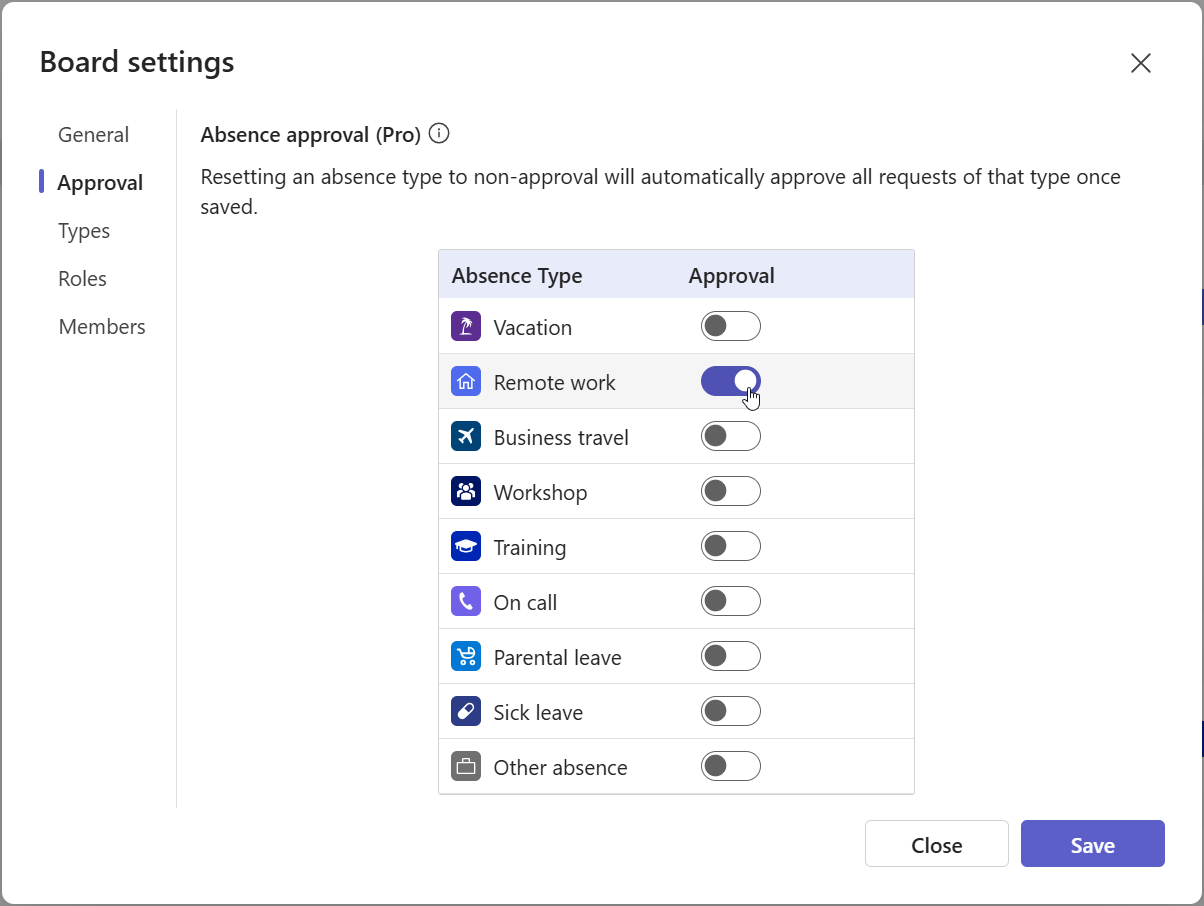
How to keep a remote work calendar up to date
The best calendar is not the one with the most features. It is the one employees can update consistently and coworkers can interpret correctly.
Establish a simple update rule
Define when plans should be recorded—for example, by the end of the previous week—and ask employees to update exceptions as soon as plans change. The rule should be memorable and realistic.
Keep entry types unambiguous
Use separate types for Remote Work, Vacation or PTO, Sick Leave, Business Travel, Training, and organization-specific statuses. Clear categories separate work location from availability.
Match approvals to the policy
If employees already have permission to work remotely, mandatory approval for every entry may add administration. If coverage needs review, define both the approver and expected response time.
Record changes where the team works
Keeping the workflow inside Microsoft Teams reduces context switching and the need to reconcile disconnected calendars, spreadsheets, and chat updates. Clear ownership still matters.
Use the calendar in real planning
Consult it when scheduling workshops, planning project phases, arranging on-site coverage, or preparing handovers. A calendar that informs decisions is more likely to stay useful.
Best practices for coordinating hybrid teams
A shared calendar works best as part of a broader remote-work agreement. These practices connect day-to-day visibility with healthy and productive ways of working.
Coordinate office days around collaboration
Being in the office only helps when the colleagues who need to work together are there at the same time.
Use in-person time deliberately
Prioritize activities that benefit from richer interaction, such as onboarding, mentoring, workshops, complex decisions, and relationship-building.
Protect focused remote time
Avoid filling remote days with unnecessary meetings simply because coworkers cannot see one another working.
Set availability expectations
Define normal working hours, reasonable response times, and how urgent questions should be raised.
Respect boundaries
Remote work should not create an expectation of permanent availability outside agreed hours.
Separate location from performance
Evaluate work through appropriate outcomes and quality measures rather than treating office presence as proof of productivity.
Review the arrangement
Ask whether the calendar, approval rules, office days, and team routines improve coordination or merely add administration.
When is a shared remote work calendar especially useful?
Team Absence is particularly useful when:
- Employees regularly alternate between home and office work.
- Remote work must be visible together with PTO and other absences.
- Managers need to understand team coverage.
- Some remote-work entries require approval.
- Departments or projects need different calendar views.
- Employees currently report plans through chat or spreadsheets.
- The organization needs structured entry types and reporting.
- Availability should remain inside the Microsoft Teams workflow.
Very small teams may coordinate informally for a while. As the number of people, locations, projects, and entry types grows, informal updates become harder to maintain and easier to overlook.
Create your remote work calendar in Microsoft Teams
Remote work can support flexibility, retention, and focused work, but hybrid teams still need reliable coordination. Employees should be able to see who is remote, who is expected in the office, and who is unavailable without assembling the answer from disconnected messages and calendars.
Team Absence brings remote work, PTO, and other absences into one structured calendar inside Microsoft Teams. Employees record plans through a consistent workflow, managers use approvals only where required, and teams coordinate meetings and coverage from a shared view.