The fastest native option for a leave calendar in Microsoft Teams is to add a Channel Calendar tab to a standard Teams channel. It helps everyone see basic absence entries in one shared place, but it is still a meeting calendar rather than a structured PTO calendar or workflow.
Good for small teams that only need a simple shared PTO calendar.
Uses Microsoft Teams functionality you already have.
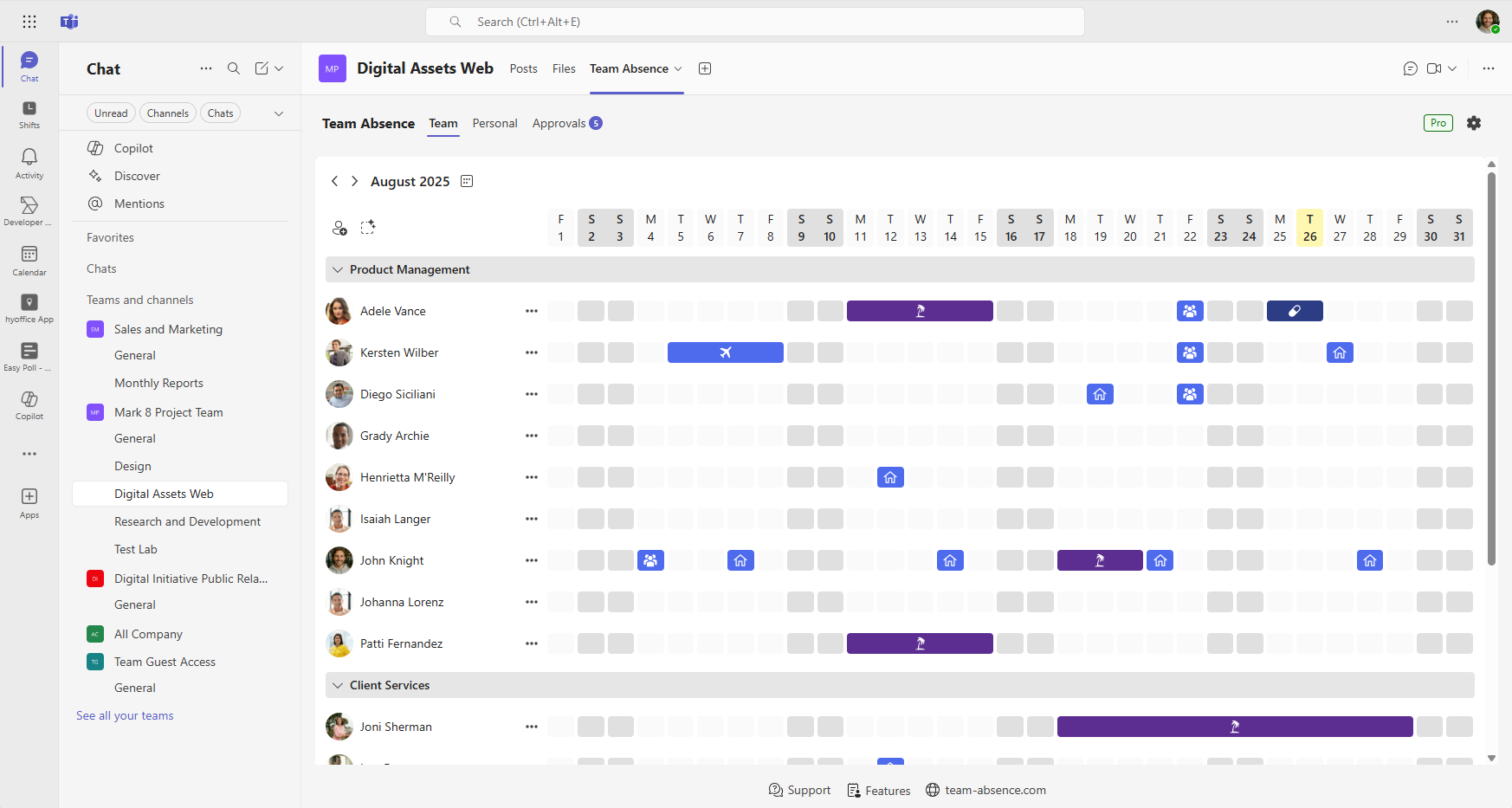
Team Absence gives your team a dedicated visual leave calendar inside Microsoft Teams, with monthly, personal, optional approval, and insight views when Channel Calendar starts to feel too manual.
Visual clarity across team and personal leave calendar views.
Outlook sync for reliable planning across Microsoft 365.
Optional PTO approval workflows for clean manager decisions.
Absence types, public holidays, and reports for a clearer planning picture.
How to Set Up a Channel Calendar in Microsoft Teams
If a simple channel calendar is enough for your team, you can set up a basic leave calendar in Microsoft Teams directly inside a standard Teams channel. The process is quick: add the Channel Calendar tab, create entries for absences, and use the resulting calendar view as a lightweight PTO calendar.
1
Add Channel Calendar to a standard channel
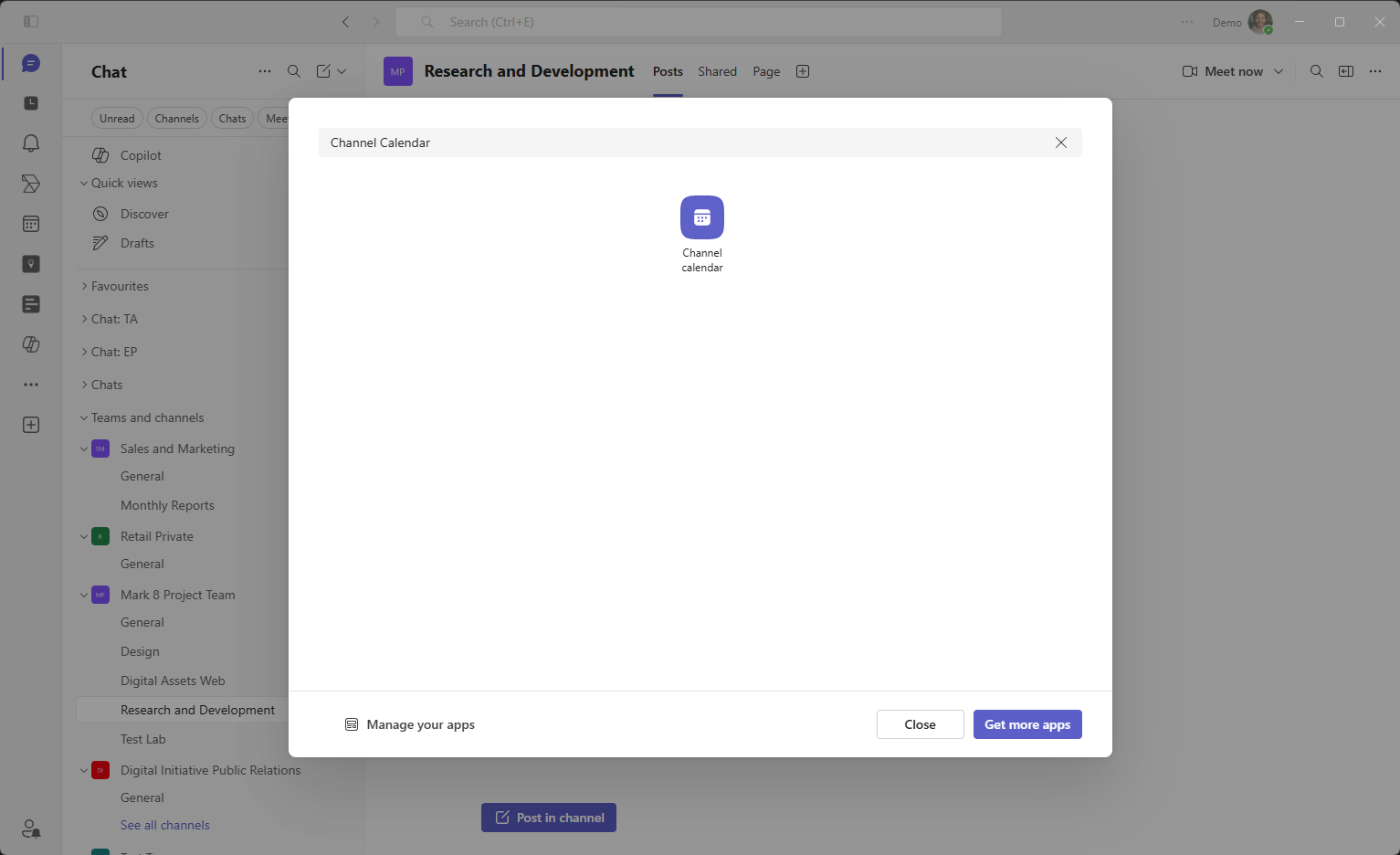
Open Microsoft Teams, go to the standard channel where the team should plan absences, click the + button, select the Channel Calendar app, and name the tab something like Team Overview or Leave Calendar.
2
Create an absence entry
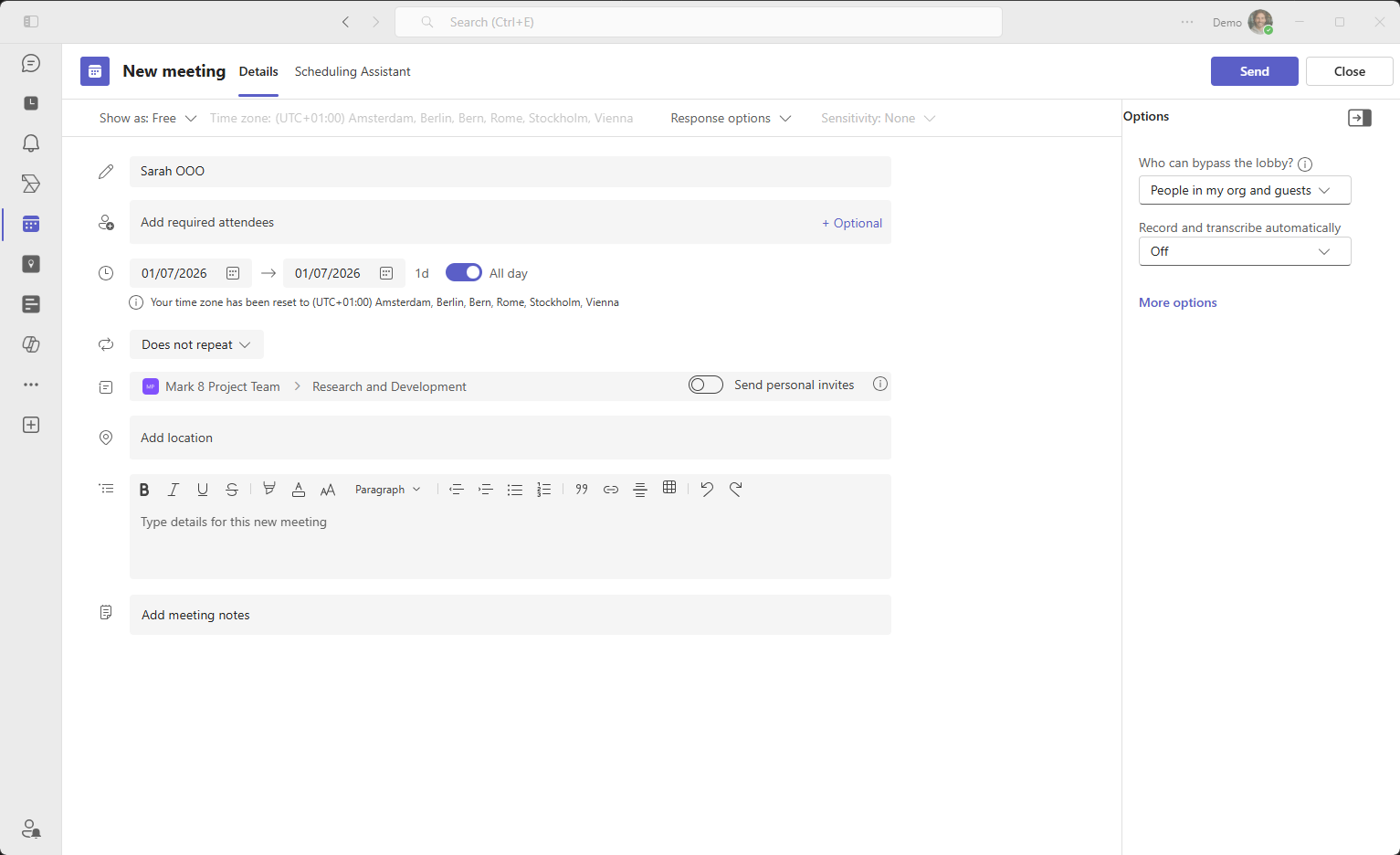
Add a calendar event for the absence. For a basic leave calendar or PTO calendar, many teams use simple titles such as Vacation - Anna, Sick Leave - David, or OOO (out of office) - Marketing.
3
Use the calendar as a shared overview
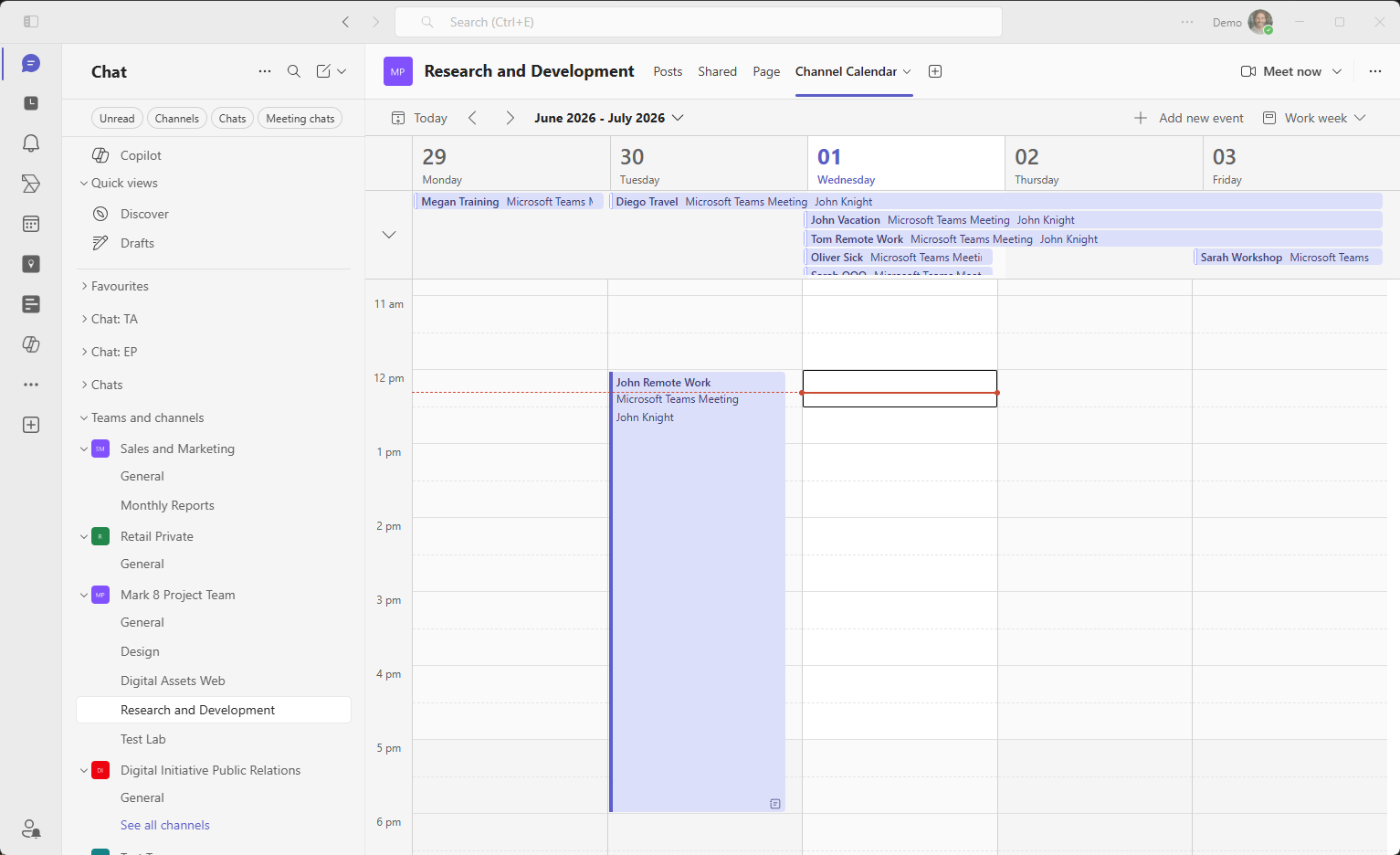
After the entries are created, the channel shows them in a shared weekly calendar view. This gives small teams a fast native overview, but the entries remain calendar events rather than structured PTO requests or PTO management records.
For small teams with informal processes, this setup may be sufficient as a simple leave calendar. However, as soon as PTO management becomes more structured, the limitations of a Channel Calendar quickly become apparent. For larger teams, the Channel Calendar can quickly look chaotic.
Channel Calendar is enough when...
Your team only needs a simple weekly overview for a basic PTO calendar.
Everyone can manually create and edit their own absence entries.
Approvals, absence balances, and reports are handled somewhere else.
Outlook out-of-office synchronization is not required.
Switch to Team Absence when...
You need a shared Microsoft Teams leave calendar for the whole team.
Vacation and PTO requests can follow an optional approval workflow.
Absences should sync to Outlook calendars and Teams availability.
Managers need public holidays, reports, and clearer monthly planning.
Disadvantages of Using a Channel Calendar as a Leave Calendar
A Channel Calendar is easy to create and immediately available, which is why many organizations start there. But while it can serve as a basic PTO calendar in Microsoft Teams, it was not designed for structured leave management or scalable PTO management. Several challenges emerge as teams grow.
Limited to a Single Channel
A Channel Calendar belongs to one standard channel. It does not create one unified leave calendar across the whole team.
Limited Views for Long-Term PTO Planning
Channel Calendar is optimized for meetings. Monthly planning, holiday seasons, and overlapping absences are harder to scan clearly.
No Structured Absence Types
Absences are only event titles, so categories such as Vacation, Sick Leave, Remote Work, or Training cannot be filtered or reported reliably.
No Built-In Approval Workflow
Employees add entries directly, or approvals happen separately in chat or email. There is no integrated request-and-approval workflow.
No Leave Analytics or Holiday Integration
There are no absence reports, yearly summaries, exports, or built-in public holiday views.
No Automatic Outlook Out-of-Office Synchronization
A Channel Calendar entry does not automatically mark the person as out of office in Outlook or Teams availability.
A Better Leave Calendar in Microsoft Teams with Team Absence
If you want a professional and scalable leave calendar or PTO calendar inside Microsoft Teams, you need a solution specifically designed for absence management. Team Absence integrates directly into Microsoft Teams and transforms leave management into a structured, centralized process. Team Absence is designed from the ground up as a leave calendar for Microsoft Teams.
Team Absence for Microsoft Teams
Monthly team calendar
See vacations, PTO, sick leave, remote work, and training in one shared Microsoft Teams absence calendar.
Optional approval workflow
Employees can request time off and managers can approve it without moving the process into chat or email.
Outlook sync
Approved absences can synchronize with Outlook calendars, helping colleagues plan meetings around real availability.
Holidays and reports
Public holidays, personal yearly views, and absence reports give managers a clearer planning picture.
Key Benefits
Structured absence categories such as Vacation, Sick Leave, Remote Work, or Training
Optional approval workflow for clarity without administrative complexity
Clear visualization of overlapping absences in a monthly team view
Annual personal views for better long-term planning
Public holiday support for over 100 countries and regions
Unified absence management across multiple channels
Outlook and Teams synchronization for reliable planning across Microsoft 365
Setting up a Channel Calendar in Microsoft Teams is easy. It can work as a basic leave calendar for small teams. However, when it comes to structured PTO management, optional approval workflows, long-term planning, holiday integration, and reliable Outlook synchronization, the Channel Calendar quickly reaches its limits. If you are looking for a scalable, structured, and professional leave calendar or PTO calendar in Microsoft Teams, Team Absence is designed specifically for that purpose. Set it up in minutes, just as quickly as a Channel Calendar, and manage your team's PTO with clarity and confidence.
Do you have any questions? Please use our contact form.


 Start for free now!